· Under the Hood · 5 min read
Your payload is too big. That's not your real problem.
Most teams switch to Protobuf because it’s 10x faster than JSON. That’s the wrong reason.
I tested it: JSON, Protobuf and Avro on the same order. The speed and size wins are real. But for most teams, they’re worth less than you think. The real reason showed up when I changed the schema.
Bandwidth is the cheap part. The schema is where it hurts.
First, the bytes
There are two families of encoding that matter here. Text, like JSON: everyone can read it, but field names travel inside every message. Binary with a schema, like Protobuf and Avro: the schema holds the names, so the message carries only values. (MessagePack and CBOR sit in the middle: binary, but the names still travel, and there’s no schema.)
I encoded a typical order in all three: 3 items with modifiers, a nested address, 6 status changes ending in DELIVERED. Synthetic data, Python on an AWS t3.micro, the kind of small VM many teams run.
- JSON: 1,076 bytes, 12.7 µs to encode, 12.2 µs to decode
- Protobuf: 470 bytes, 0.9 µs to encode, 1.4 µs to decode
- Avro: 417 bytes, 26.6 µs to encode, 19.1 µs to decode
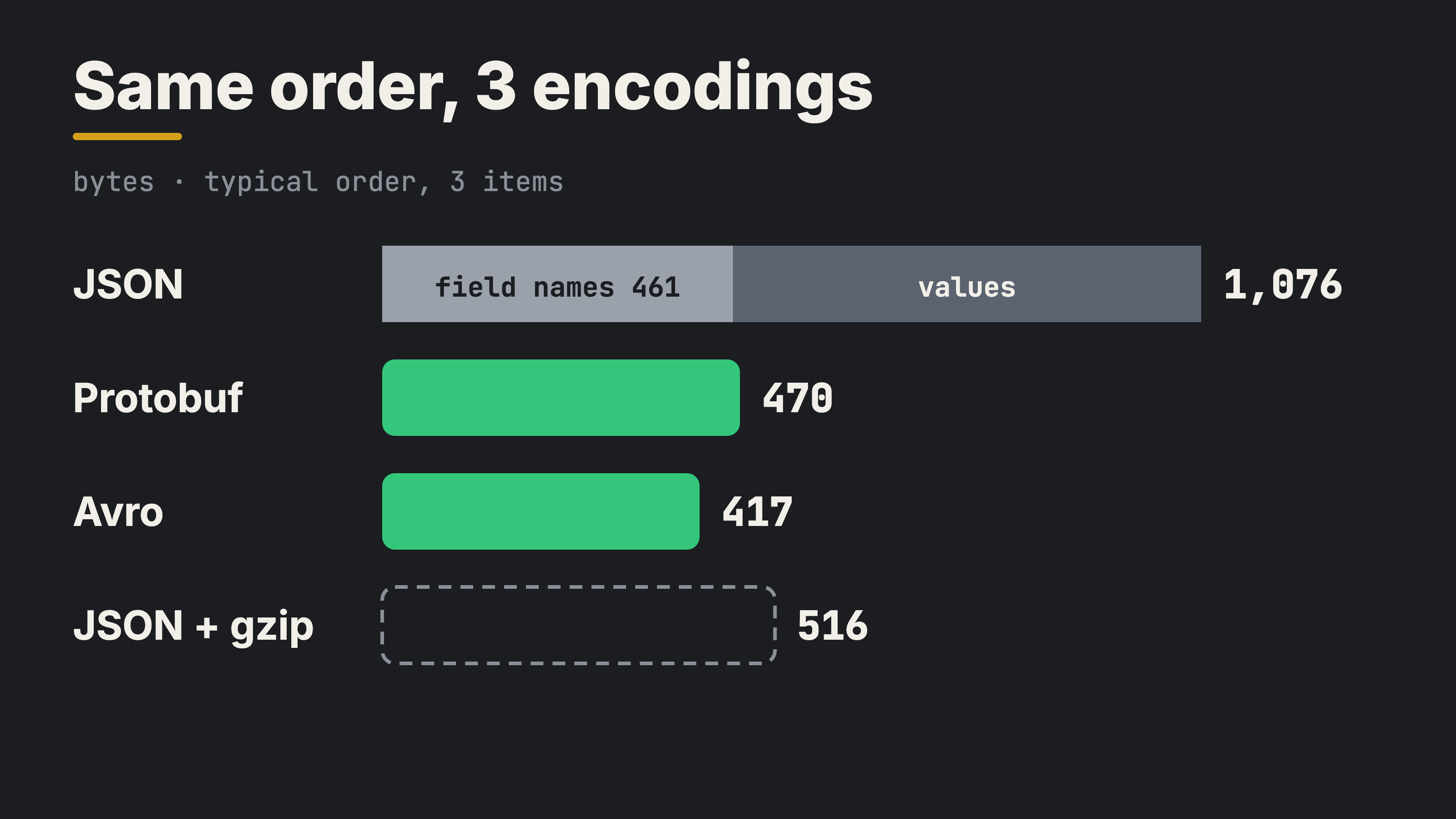
Almost half of this JSON is just field names: 43%. Protobuf cut the order to 44% and was about 10x faster. Nice. Now stretch it to real traffic. Between your own services, AWS charges $0.01/GB on each side when a call crosses availability zones. I assumed every call does. Inside one zone it’s free.
- 100 RPS: $38 a year, 0.002 cores
- 1,000 RPS: $377 a year, 0.023 cores
- 10,000 RPS: $3,770 a year, 0.23 cores
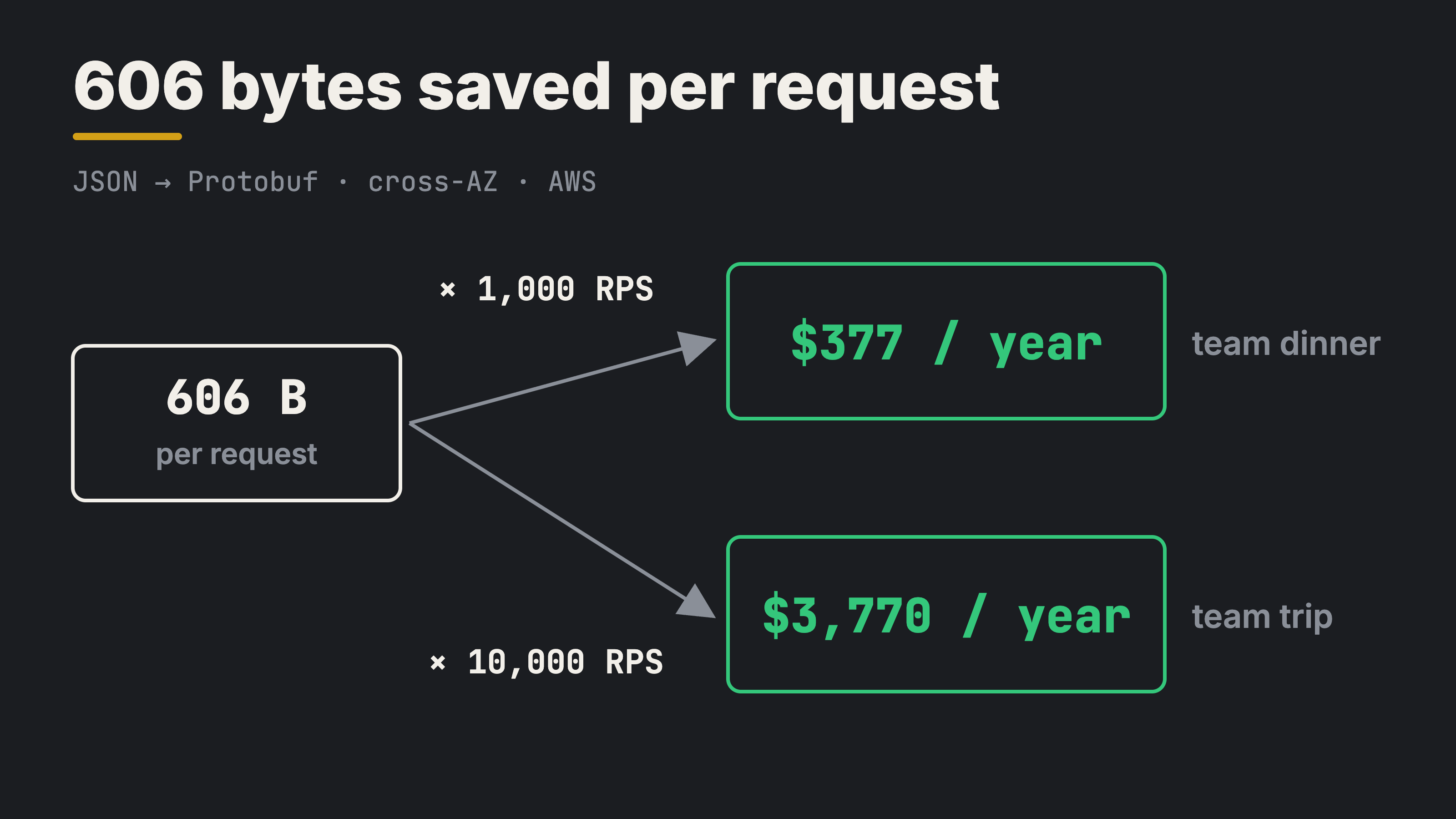
At 1,000 RPS, you saved about $380 a year. Cool, that’s one team dinner. Nobody gets promoted for a dinner. At 10,000 RPS, it’s about $3,800 a year. A nice team trip. Still not a promotion.
Before you switch: climb the levels
Protobuf isn’t the first step. I started again from an untrimmed order, the way many APIs send it: full customer, restaurant and product objects, payment, courier, metadata. 2,672 bytes. Then I climbed, one cheap step at a time.
- Level 0, untrimmed JSON: 2,672 bytes (100%)
- Level 1, trim the fields the client doesn’t use: 1,076 bytes (40%)
- Level 2, compact JSON, no spaces: 989 bytes (37%)
- Level 3, gzip: 510 bytes (19%)
- Level 4, Protobuf: 470 bytes (18%)
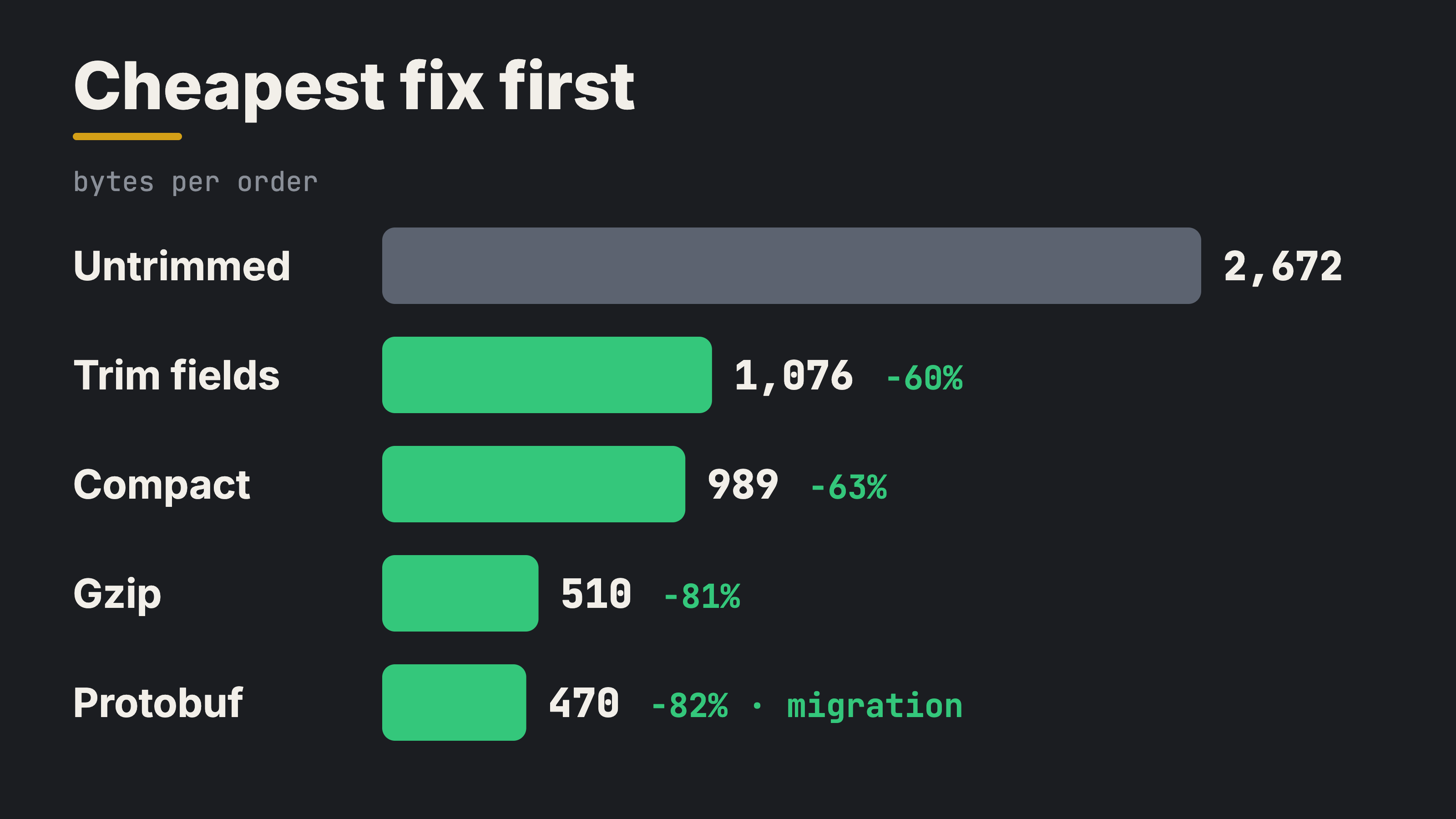
Trimming alone cut 60%. No new tools, no migration. Gzip took it to 19% with one config line. Protobuf, the big migration, got 18%. One more point.
So climb in this order, and stop when it’s enough. For most teams, that’s level 3, and the bytes stay cheap. If size was the only question, I’d stop there.
But size is not the real question.
The real problem: two versions at the same time
You usually don’t deploy all your servers at once. During a rolling deploy, v1 and v2 of your service run side by side. v2 writes a message, v1 reads it. v1 writes, v2 reads. And if v2 has a bug and you roll back, everything v2 already wrote is still there: in the queue and in the database. Now old code reads new data.
And some data lives much longer than your code. A Kafka topic with a week of retention. A data lake with three years of orders. Code you deploy today will read data written by code you deleted last year.
And the oldest readers live in your users’ pockets. Mobile app versions stay on phones for months, and you can’t roll them back. In one mobile app, a field was renamed by accident, between two releases: price became totalPrice. Old app versions still asked for price. It wasn’t there anymore, and they crashed.
So the real question is: what happens when the schema changes?
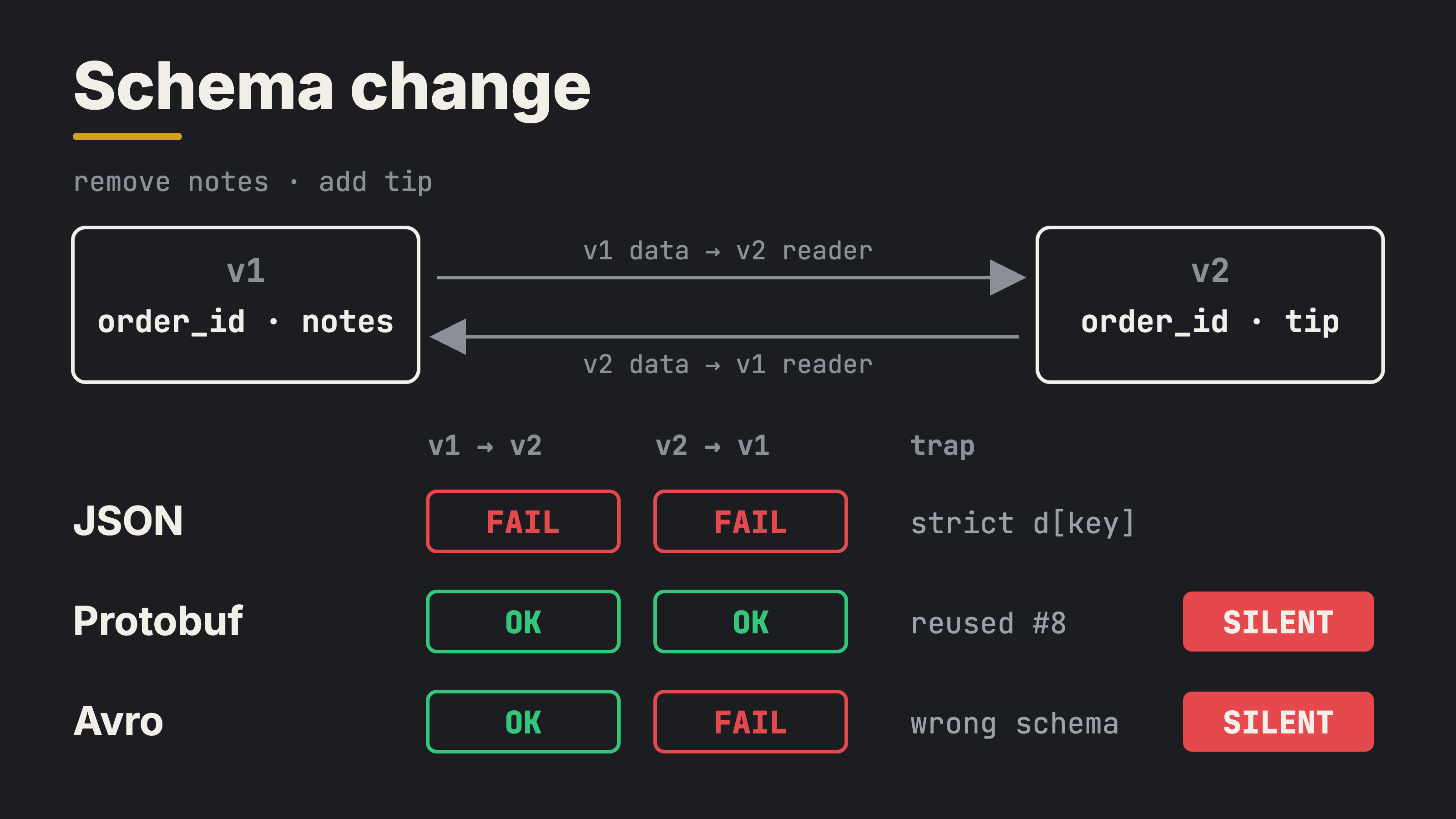
I tested that too. I removed one field, notes, and added another, tip. Then I let old readers read new data, and new readers read old data.
- JSON:
KeyErroron the first strictd["notes"]. It works only if every reader uses.get()with a default. The format doesn’t care. The rule lives in every reader’s code, and nothing enforces it. - Protobuf: both directions worked. Unknown fields are skipped, missing fields get defaults. Then I gave the new field the old field’s number. No error. Just a wrong value.
- Avro: new readers read old data fine, because
tiphad a default. Old readers failed on new data, becausenoteshad no default. Then I gave the reader the wrong writer schema. It readtip = 46. Garbage, and no error.
The loud failures are fine. You see them in the logs, you fix them. The silent ones are the dangerous ones. This bug has no error message. A wrong tip or a wrong price, and nobody knows until a customer calls.
The rules that keep you safe
Every format has its rules. The format doesn’t protect you. The rules do.
- JSON: readers ignore fields they don’t know and use a default for missing ones. But only for optional fields. If a required field like
priceis missing, fail loudly. A crash is better than a £0.00 order. Write the contract down, with JSON Schema or OpenAPI, and test it in CI. - Protobuf: never reuse a field number. When you remove a field, mark its number and name as
reserved, so nobody can take them by mistake. Never change a field’s type. And remember: a missing number field reads as 0. If 0 is a real value for you, useoptional. - Avro: only add or remove fields that have a default. Keep schemas in a schema registry, so every reader gets the exact writer schema. Turn on its compatibility check, so a breaking schema can’t be published at all.
Decision
- Browser and public API: trimmed JSON with gzip. Everyone can read it and debug it with curl. Protect it with a written contract.
- Between your own services: Protobuf. Not for the bytes, they’re cheap. For the schema, with
reservedand a lint check in CI. - Data that lives long, like Kafka topics or a data lake: Avro with a schema registry and its compatibility check on.
Trade-off
Schemas give you safe changes and smaller messages. They cost you readability: you can’t read a Protobuf message in the logs or with curl. You also need tooling, .proto files or a schema registry, and the team must learn the rules. That’s real work. But it’s cheaper than finding a silent tip = 46 in production.
Principle
Pick the encoding by who reads the data and how long it lives.
Code and full results: https://github.com/archemist-dev/labs/tree/main/01-payload-encoding
Credit: the encoding families and the schema evolution idea follow chapter 4 of Designing Data-Intensive Applications by Martin Kleppmann. The words, test and numbers are mine.